The APX Session
An APX session is the lifetime of one active connection between an APX client and an APX server. The session uses RemoteFile to make three kinds of node data available across that connection:
the node definition (
.apx);values produced by the node (
.out); andvalues consumed by the node (
.in).
The connection is stateful, but it is not a request-response conversation. After setup, both peers retain mirrored byte arrays and exchange writes only for the ranges that change. The APX server interprets those ranges as port values and routes them between compatible nodes.
Note
This page explains how the pieces cooperate. The normative wire format, command encodings, and addressing rules are defined by the RemoteFile protocol specification.
The three files of a node
The easiest way to understand a session is to begin with ownership. A file is published by the peer that owns its authoritative contents; the other peer opens it and maintains a mirror.
![@startuml
skinparam backgroundColor transparent
skinparam componentStyle rectangle
skinparam shadowing false
skinparam defaultFontName sans-serif
skinparam ArrowColor #3B4A54
skinparam component {
BackgroundColor #F7F8F6
BorderColor #53616A
FontColor #172126
}
skinparam rectangle {
BackgroundColor #FFFFFF
BorderColor #85929A
FontColor #172126
}
rectangle "APX client" as client {
rectangle "Application" as app
component "Node definition\n<Node>.apx" as capx
component "Provide data\n<Node>.out" as cout
component "Require-data mirror\n<Node>.in" as cin
capx -[hidden]down-> cout
cout -[hidden]down-> cin
}
rectangle "APX server" as server {
component "Mirrored definition" as sapx
component "Mirrored provide data" as sout
component "Require data\n<Node>.in" as sin
rectangle "Parser and\nport router" as router
sapx -[hidden]down-> sout
sout -[hidden]down-> sin
}
app -right-> cout : writes
cin -left-> app : reads
capx -right-> sapx
cout -right-> sout
sin -left-> cin
sapx -right-> router : interface and layout
sout -right-> router : provided values
router -left-> sin : required values
@enduml](../_images/plantuml-cd689167860111472e4ee9d308c1e61d1b25435e.svg)
File |
Authoritative owner |
Contents |
Normal write direction |
|---|---|---|---|
|
Client |
APX IDL definition |
Client to server |
|
Client |
Packed provide-port values |
Client to server |
|
Server |
Packed require-port values |
Server to client |
The suffixes are from the node’s point of view: .out carries data out of the
node and .in carries data into it. They do not describe the direction of a
socket or a server API.
Each file occupies an address range in its owner’s local RemoteFile map and the peer’s remote map. Therefore, equal numeric addresses on opposite peers do not refer to the same storage. Frequently updated port-data files are allocated in the low-address area when possible so that their writes can use the compact two-byte address header. Definition files are normally placed in a higher address range because they are transferred infrequently.
Establishing the connection
Before files can be synchronized, the peers agree on RemoteFile framing.
The transport connection is established. TCP and UNIX domain sockets are examples; RemoteFile itself is transport-independent.
The client sends the text greeting as its first framed message. A typical greeting is
RMFP/1.0\nNumHeader: 32\n\n.The server validates the greeting and replies with a binary
RMF_CMD_ACKin the RemoteFile control area.After accepting the acknowledgement, the client enables file publication and normal RemoteFile command processing.
The greeting selects the RemoteFile protocol version and message framing. It does not negotiate APX ports or transfer a node definition. Those operations happen through ordinary RemoteFile file-management commands after the greeting has been accepted.
Bringing a node online
A node does not become usable through one monolithic handshake. Its definition, provide data, and require data progress independently as files are published, opened, and initialized. The definition is the dependency that lets the server construct the other two data models.
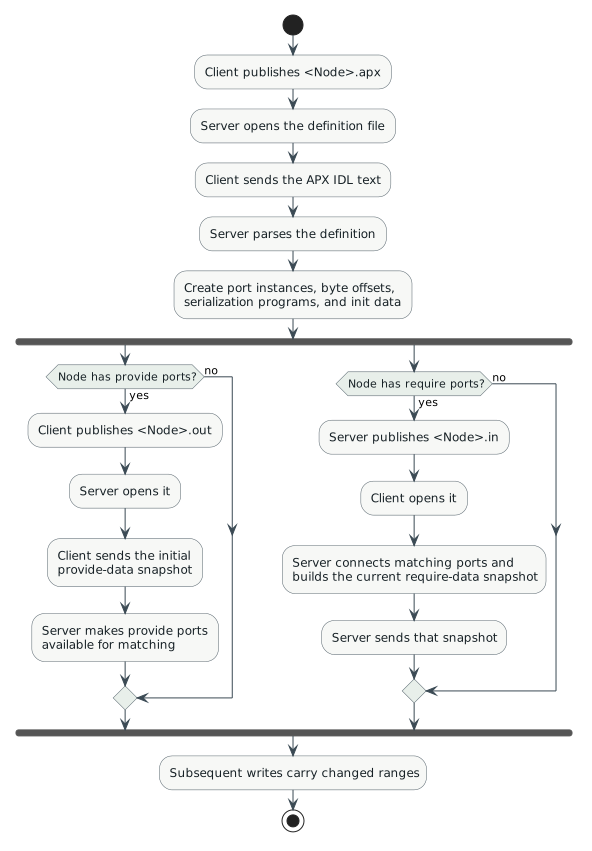
This diagram intentionally shows parallel branches. Network scheduling and file announcement order can interleave, and a node may contain only provide ports or only require ports. What matters is each file’s own readiness, not a single global phase number.
Definition synchronization
The client already has the definition because it builds its local node from
APX IDL before attaching the node to a connection. It publishes the definition
as <Node>.apx, optionally with a digest.
When the server receives the FileInfo command, it creates a provisional node
instance and opens the remote file. The server does not yet know the ports or
their byte layout. It first receives the complete definition, parses it, and
then creates:
provide- and require-port instances;
pack and unpack programs;
a byte offset and encoded size for every port;
initial provide and require data; and
server-side connector and byte-to-port lookup tables.
In the c-apx reference implementation, parsing is triggered only when a write starts at offset zero and covers the complete definition file. This is an implementation readiness condition, not an additional RemoteFile command.
Port-data synchronization
Once the definition has been parsed, each non-empty port direction gets a fixed-size byte array. Ports appear consecutively in definition order. If provide ports have encoded sizes \(s_0, s_1, \ldots, s_{n-1}\), the offset of provide port \(i\) is
Require ports are laid out independently using the same rule. An offset in
.out therefore has no implied relationship to the same offset in .in.
The initial transfer is a full snapshot:
opening
.outcauses the client to send its initialized provide buffer;opening
.incauses the server to connect available providers, update the require buffer with their current values, and send the resulting snapshot.
After that snapshot, a write may cover one port, several adjacent ports, or a portion allowed by the underlying file API. The server uses its byte-to-port map to determine which provide ports are affected.
How ports are matched
The server does not route by byte offset and does not require a central signal database. It derives a port signature from every parsed port and indexes provide and require ports by that signature.
For the c-apx reference implementation, the signature contains the port name and its resolved data signature, including relevant array and range information. Matching therefore requires equal generated signatures. A name match alone is insufficient.
When a compatible provider and requester meet, the server creates a connector from the provide-port instance to the require-port instance. A provide port can have several connectors, which gives APX its one-to-many fan-out. The provider’s current value is copied into a newly connected require port so that the consumer does not have to wait for the next application update.
Important
Port initializers are fallback data, not a competing source of truth. A require buffer begins with its declared initial values, but a connected provider’s current value replaces the corresponding bytes.
A value update from producer to consumers
The following view follows data rather than protocol messages. Its purpose is to show why offsets can change while the encoded value remains unchanged.
![@startuml
left to right direction
skinparam backgroundColor transparent
skinparam shadowing false
skinparam defaultFontName sans-serif
skinparam rectangle {
BackgroundColor #F7F8F6
BorderColor #53616A
FontColor #172126
}
skinparam database {
BackgroundColor #FFFFFF
BorderColor #53616A
FontColor #172126
}
skinparam ArrowColor #3B4A54
rectangle "Producer client" as producer {
rectangle "Application writes\nVehicleSpeed = 100" as write
database "Producer.out\nprovide-port offset 0" as out
}
rectangle "APX server" as server {
database "Mirrored Producer.out" as mirror
rectangle "Byte-to-port lookup\n+ connector table" as route
}
rectangle "Consumers" as consumers {
rectangle "Consumer client 1" as consumer1 {
database "Consumer1.in\nrequire-port offset 4" as consumer1in
rectangle "Require-port callback" as callback1
}
rectangle "Consumer client 2" as consumer2 {
database "Consumer2.in\nrequire-port offset 0" as consumer2in
rectangle "Require-port callback" as callback2
}
consumer2in -[hidden]down-> consumer1in
}
write --> out : 1. serialize
out -right-> mirror : 2. delta write
mirror --> route : 3. port lookup
route -right-> consumer1in : 4a. write at offset 4
route -right-> consumer2in : 4b. write at offset 0
consumer1in --> callback1 : 5a. notify
consumer2in --> callback2 : 5b. notify
@enduml](../_images/plantuml-6d5c2b29ab98eb8a06c2a8716f71e547c46dbe06.svg)
The update follows these steps:
The producer serializes the new value into its local
.outbuffer.RemoteFile sends the changed range after confirming that the server has opened the file.
The server updates its mirror and maps the written source bytes to one or more provide ports.
For every connector, the server writes the encoded value into that require port’s offset in the consumer’s
.inbuffer.RemoteFile sends those destination ranges to the consumers. A client updates its mirror and can notify the application about the affected require port.
No APX port name is carried with the runtime value write. Names and types were resolved during definition processing; runtime traffic needs only an address and bytes.
Per-file state
The c-apx implementation records synchronization state separately for the definition, provide data, and require data. A useful conceptual state machine for any one direction is:
![@startuml
skinparam backgroundColor transparent
skinparam shadowing false
skinparam defaultFontName sans-serif
skinparam state {
BackgroundColor #F7F8F6
BorderColor #53616A
FontColor #172126
}
skinparam ArrowColor #3B4A54
[*] --> Initial
Initial --> WaitingForPublication : peer owns the file
Initial --> WaitingForOpen : local endpoint owns the file
WaitingForPublication --> WaitingForData : receive FileInfo / send FileOpen
WaitingForOpen --> Synchronized : receive FileOpen / send snapshot
WaitingForData --> Synchronized : receive initial snapshot
Synchronized --> Synchronized : receive or send delta writes
Synchronized --> Revoked : FileRevoke
Synchronized --> Disconnected : transport closes
WaitingForPublication --> Disconnected
WaitingForOpen --> Disconnected
WaitingForData --> Disconnected
Revoked --> [*]
Disconnected --> [*]
@enduml](../_images/plantuml-4ac7a828bb10cc0a80d1ff3e57de0d70801a05e4.svg)
The exact transition that marks a locally owned file synchronized is an implementation detail, but the distinction between waiting for publication, waiting for an open request, and waiting for initial data is useful when diagnosing a stalled session.
Disconnect and reconnect
When a connection closes, the server removes that connection’s nodes from its signature map and disconnects their port connectors. Remaining nodes stay attached to the server, but they no longer receive values from the departed providers or send values to departed requesters.
RemoteFile also defines FileClose and FileRevoke commands for changing file
availability while a connection exists. Support for every teardown path can
vary by implementation; in particular, the c-apx node-level file-close
callback is not fully implemented. A transport reconnect should therefore be
understood as a new synchronization cycle: greeting acceptance, file
publication, initial snapshots, and port reconnection are established again.
What belongs to which layer?
Concern |
RemoteFile |
APX session logic |
|---|---|---|
Stream framing and greeting |
Yes |
No |
Virtual addresses and control area |
Yes |
No |
Publish, open, close, and revoke files |
Yes |
No |
Meaning of |
No |
Yes |
Parsing node and port definitions |
No |
Yes |
Port signature matching |
No |
Yes |
Routing one provide value to require ports |
No |
Yes |
Keeping this boundary in mind makes the system easier to reason about: RemoteFile synchronizes named byte arrays; APX gives those byte arrays a node, port, and routing meaning.